

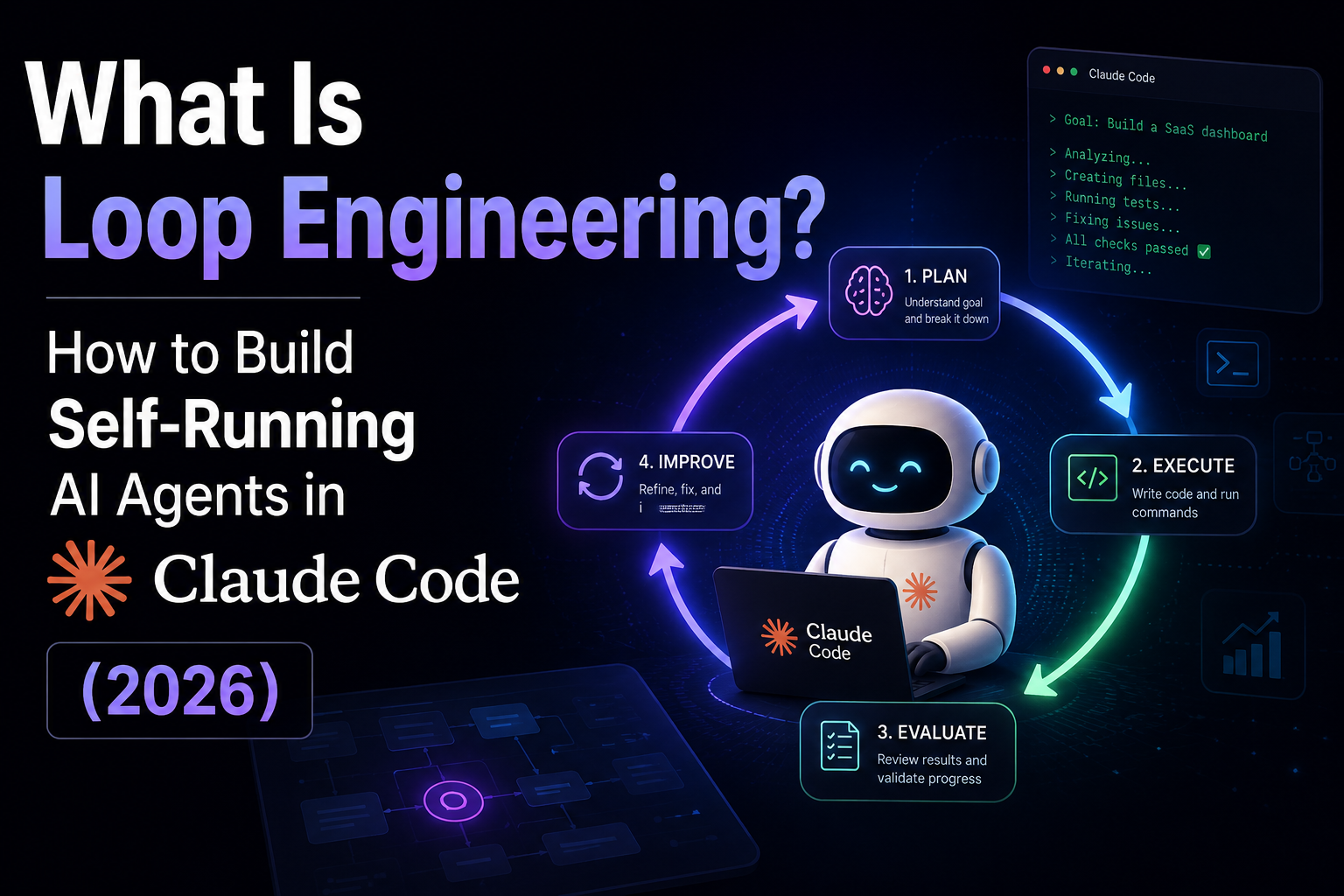
Loop engineering is the skill quietly replacing prompt engineering in 2026. Instead of typing one prompt at a time, you design a system that prompts an AI agent for you. As a result, the agent works on its own until the job is done. In fact, Boris Cherny, the head of Claude Code at Anthropic, merged 259 pull requests in 30 days, and Claude Code wrote every one. So if you already use Claude Code, Cursor, or Codex, you touch loop engineering daily. Here is how it works.
Key takeaways
- Loop engineering means designing the system that prompts an AI agent, so it runs without you in the chair.
- Addy Osmani coined the term in June 2026, building on ideas from Anthropic’s Boris Cherny.
- Every loop needs three parts: a schedule, a generator, and a checker that can say no.
- In Claude Code, you start a loop with one simple command:
/loop.
What is loop engineering?
Loop engineering is the practice of building systems that prompt AI agents automatically, instead of you typing each prompt by hand. First, you give the agent a goal, a codebase, and a set of tools. Then the agent loops: it reads files, writes code, runs tests, reads the errors, and tries again. Therefore your role moves up a level, from operator to system designer.
Addy Osmani named the pattern in June 2026, although teams at Anthropic were already living it. Above all, the idea is about leverage. As Andrej Karpathy put it, “remove yourself as the bottleneck.” In other words, you put in a few tokens, and the system does the heavy lifting for you.
Moreover, the quality gap between AI coding tools rarely comes from the base model. Instead, it comes from the loop design around it. Because scheduling, memory, and verification decide what actually ships, two agents on the same model can produce very different results. So loop engineering, not raw model power, is where the real leverage now lives.
Loop engineering vs prompt engineering
Prompt engineering tunes a single message, while loop engineering tunes a repeating system. With a prompt, you stay in the chair. You read each reply, and then you type the next instruction. With a loop, however, you set the goal and the guardrails once. After that, the agent drives itself until it finishes or hits a limit. As Boris Cherny said plainly, “my job is to write loops.”
| Dimension | Prompt engineering | Loop engineering |
|---|---|---|
| Your role | Operator typing each prompt | Designer of the system |
| Execution | One shot, then you review | Repeats until done |
| Human involved | Every single step | Only at start and stop |
| Key skill | Wording a request | Scheduling and verification |
| Scales with | Your typing speed | Compute and guardrails |
Still, prompt engineering has not died. Instead, it now lives inside the loop, as the instruction the system sends on every pass. In short, loop engineering simply wraps a good prompt in automation.
The anatomy of an agent loop
Every agent loop moves through the same cycle, and it repeats until a stop condition fires. This cycle sits at the core of how Claude Code operates under the hood. Once you understand it, you can debug a loop that stalls or burns tokens. For deeper background, see our guide to constrained and unconstrained flow for LLM agents.
So the cycle has four clear stages, and each one feeds the next:
- Plan — first, the agent breaks the goal into small steps.
- Execute — next, it writes code and runs commands.
- Evaluate — then it checks the results, such as test output.
- Improve — finally, it fixes the problems and loops again.
How to implement loop engineering in Claude Code
In Claude Code, you do not build the loop from scratch. Instead, you start one with the /loop command and a task, as the 2026 guide shows. After that, the agent runs the cycle on its own. For example, here are three common loops:
/loop 5m /babysit          # check code review every 5 minutes
/loop 30m /slack-feedback  # process Slack feedback every 30 min
/loop check the deploy     # dynamic interval set by conditions
Next, anchor the loop with a few project files, because stable context keeps the agent on track across many passes. Specifically, four files do most of the work:
- VISION.md — the product direction, constraints, and success criteria.
- CLAUDE.md — the operating rules applied on every pass.
- PROMPT.md — the instruction piped into the agent each tick.
- Tests or type checks — the layer that grades each cycle.
Finally, if you want a fully closed loop in the terminal, the popular “Ralph loop” wraps Claude Code in a short shell script. As a result, it keeps running until your task list is empty:
#!/bin/bash
MAX=10
for i in $(seq 1 $MAX); do
  cat PROMPT.md | claude -p --dangerously-skip-permissions
  grep -q "BLOCKED" specs/TODO.md && break
  grep -q "[ ]" specs/TODO.md || break   # stop when no open tasks
  sleep 10
done
In short, you get a schedule, a generator, and a checker, all in a few lines. However, do start small. First, test the loop on a tiny task. Then, once you trust it, hand it bigger work.
Guardrails that keep your AI agent in check
Half of loop engineering is design, while the other half is something that can say no. Without limits, an agent loops forever, and the bill grows fast. For instance, Uber capped its engineers at $1,500 per person each month, because teams burned an annual budget in just four months. Moreover, a single agent runs at roughly $10.42 per hour, so a runaway loop costs real money.
Therefore, always set three hard stops before you go autonomous:
- Max iterations — for example
MAX_ITER=20, so the loop cannot run forever. - No-progress detection — so the loop exits when the same error repeats.
- A token or dollar budget — so spending stops at a hard cap.
Above all, keep a strong verification layer. Because tests and lint checks are the “no” that turns a risky loop into reliable work, they matter as much as the prompt itself. For a deeper look at safe autonomy, read our guide to secure agentic architectures.
Frequently asked questions
Is loop engineering the same as agentic workflows?
Not quite, although they overlap. An agentic workflow is any task an agent runs. Loop engineering, however, is the discipline of designing the schedule, the prompt, and the verification that let the agent repeat work on its own.
Do I need to code to use it?
No. In Claude Code, you start a loop with one command and a plain-English task. Still, you do need a way to verify output, such as tests. Because of that, even vibe coders run loops every day without building the agent themselves.
How much does a loop cost to run?
A single agent costs about $10.42 per hour. Without a budget cap, however, costs climb quickly. Therefore, hard spending limits are essential before you let any loop run unattended.
Conclusion
Loop engineering is the real leverage shift of 2026. Instead of prompting the agent, you now design the system that prompts it. Fortunately, the recipe stays simple: a schedule, a generator, and a checker that can say no. Because Claude Code gives you all three behind one /loop command, you can start today. So pick a small task, add your guardrails, and let the loop run while you watch.